
Open your website in a new tab and give yourself two minutes. Try to find five things:
- The name of your current president.
- The date of your last AGM.
- The minutes from it, or at least a note of what was decided.
- A photo of the committee you have now.
- And an email address that reaches someone who is still on that committee.
Be honest about how you went. If you found all five, you’re ahead of most organisations. If you got stuck on the first one, your website is still living in last year, and the people most likely to notice are your own members.
It matters more than it seems. A member who can’t find out what was decided doesn’t assume anything sinister. They assume nobody is minding the shop, or they email the secretary, who is already the busiest person in the organisation. Making the outcome of the AGM easy to find is good governance. It’s the one night a year the organisation formally reports to its members, and the website is where that report should live afterwards.
The timing is tighter than most committees realise. Consumer Affairs Victoria says an incorporated association’s AGM must take place within 5 months of the end of its financial year. For a 30 June year end, that’s 30 November. If your AGM is done or about to happen, this is the month to update the website too.
Why the website never makes the after-the-AGM checklist
The meeting ends. Everyone is tired, the minutes take a few weeks, and the person who looks after the website is usually a volunteer who is also running something else. The website was never really anyone’s job.
Nothing breaks, and nothing sends you an alert. The old agenda just sits there, the old committee stays on the team page, and the website quietly drifts a year out of date. The same pattern runs through most website problems: something changes, nobody notices, and it costs you later.
Here are eight things worth updating after your AGM, in roughly the order I’d do them.
1. Post the outcomes within a few days
Minutes take weeks. Members shouldn’t have to wait that long to find out who was elected and what was decided. Large listed companies handle this by releasing the voting results as a separate announcement straight after the meeting, with the full documents following later. You can do the same on a small scale.
Write a short post or send an email within a few days: thank the people who came, list the resolutions that passed, name the new committee and their roles, and say when the draft minutes will appear. Four short paragraphs is enough. It also gives the later steps a place to link back to.
2. An AGM page that changes with the meeting
The cleanest approach is one page that does the job all year. Before the meeting it carries the notice, the agenda, the nomination details and any proxy form. Afterwards the agenda gives way to the outcomes, the draft minutes and the documents. The Alexandra and District Traders and Tourism Association website works this way, with the outcomes at the top, a minutes status that says “draft, awaiting member confirmation”, and past meetings listed by year underneath.
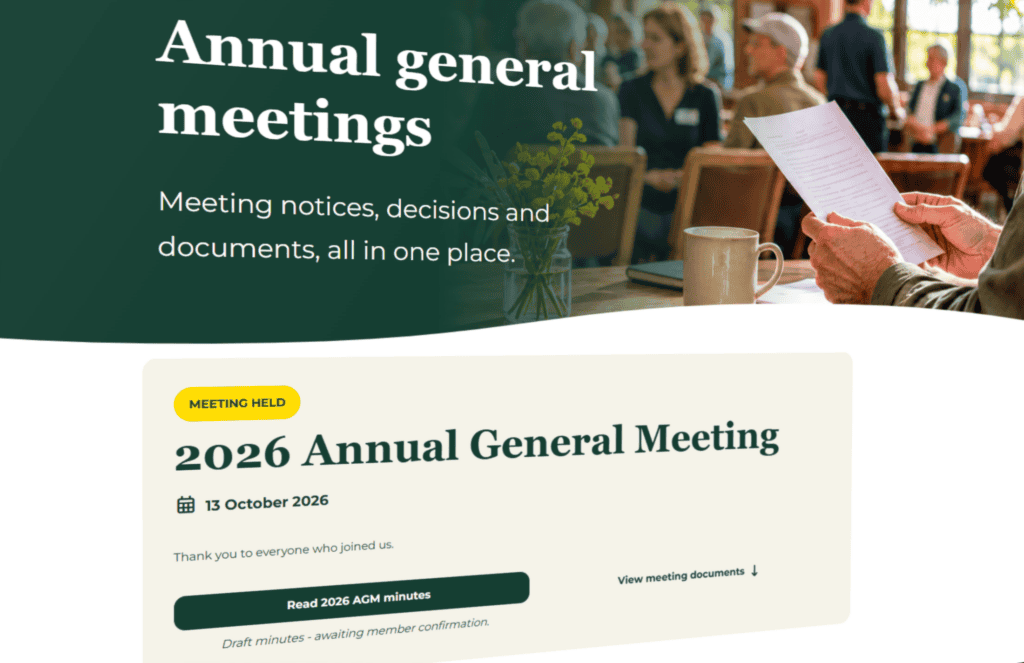
A few details are worth copying.
Put the whole pack in one place. For a Victorian incorporated association, the AGM minutes must include copies of the financial statements, the certificate signed by two committee members, and any audit or review report, according to Consumer Affairs Victoria. Members can also ask in writing for the minutes, and the association has 14 days to supply them. A page where they’re already available saves everyone an email.
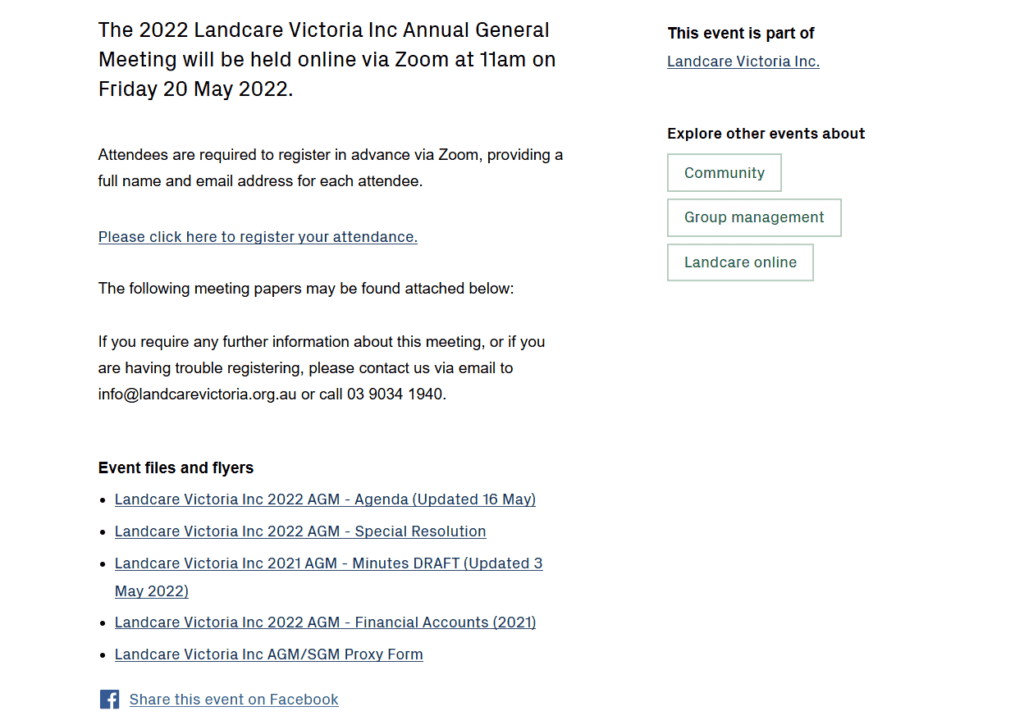
Label the minutes as draft until they’re confirmed at the next meeting, and show the date each document was last updated. Landcare Victoria’s 2022 AGM page does exactly this, with files such as “2021 AGM Minutes DRAFT (Updated 3 May 2022)”.
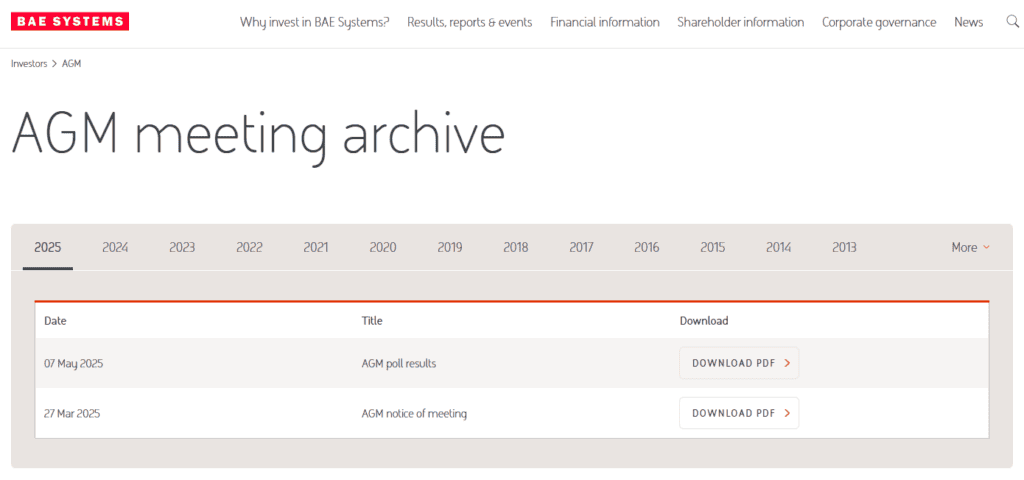
Keep every year, and lay them out the same way. BAE Systems, a global defence company, has an AGM archive with a link for each year back to “2010 and earlier”, and every year uses the same table: date, title, download. The point is that nobody has to work out where the 2023 minutes went. Put the year in every file name, so you don’t end up with three PDFs called “minutes-final”.
Decide what’s public and what’s members-only. Some organisations publish everything, and some keep minutes behind a member login. Either can be right, but it should be a decision the committee makes, not one that happens by accident because nobody knew whose job it was.
3. The committee page, with a photo taken at the AGM
The AGM is the one night a year when the whole committee is in the same room. Take the photo then. A phone photo against a plain wall is fine, and write down names and roles on the spot, because nobody remembers how a new member spells their surname three weeks later.
The most common thing I see on a team page is a photo of the president that’s two years out of date. Nobody decided to leave it there. It just never came up again after the last time someone updated the site.
So update the team or about page: add the new people, remove the ones who have stepped down, and replace the old photo. Anyone deciding whether to trust your organisation, from a funder to a new member, looks at this page to see who they are dealing with.
4. The president’s report, shared with the community
The president’s report is usually the best summary of your year that exists. It covers what happened, what it cost, and what’s coming, and it gets read once by the people in the room.
Ask for the written version in the same week, before it disappears into someone’s email. Post it as a year in review on your website, or turn it into a media release for the local paper and your newsletter. Check with the committee first for anything that was meant for members only, and leave that out.
5. Guest speakers, slides and a recording
If someone spoke at your AGM, such as a council officer, a funder or a regional development manager, write a short summary of their key points. It helps the members who couldn’t attend, and it gives the speaker something they can share too. Send them the draft before you post it.
The same goes for any slides, and for the recording if you ran the meeting on Zoom. A member who couldn’t make it on the night can then catch up in ten minutes instead of waiting for the minutes.
6. What members raised, and what happens next
This is the one most organisations skip, and it costs the least. Questions and concerns get raised at every AGM, and they’re usually noted in the minutes and then forgotten. Add a short section to the outcomes post or the AGM page: what was raised, who is looking at it, and when members will hear back.
Then do what it says. Following through is the thing members remember, and it’s the difference between a page that reports on the meeting and one that shows the committee is listening.
7. The year ahead
New strategies and initiatives are often announced at the AGM and then live only in the minutes, where almost nobody reads them. Put a short section on your home page or about page about what you’re working on this year. Include the year in the heading, so that in twelve months it’s obvious whether the page has been looked at.
8. Contact details that still reach someone, and the things that have expired
This is the one with a real mechanism behind it, and it’s easy to check. Send a test email to every address on your contact page and see who replies.
Contact addresses for community groups are often tied to a person rather than a role: a personal Gmail, or an address for someone who left the committee two AGMs ago. Messages from members and the public land in an inbox nobody reads, and the sender never learns they went nowhere. Role-based addresses such as secretary@ and president@ on your own domain, forwarded to whoever currently holds the job, mean the website doesn’t need touching after every election. Changing the forwarding still needs someone with access to your domain and email settings, which is why I keep telling people to check who owns those accounts.
While you’re there, search your own site for the word “nominations”, for “AGM”, and for last year’s date. You’re looking for the call for nominations that closed weeks ago, the proxy form for a meeting that’s finished, the banner that still says “AGM this Thursday”, and the membership renewal deadline that has passed. Each one is small, but together they tell visitors the site isn’t being looked after.
The 30-minute after-the-AGM checklist
If the AGM has just finished and you’re flat out, start with the contact email test, which takes five minutes. Then post a short outcomes note with the resolutions and the new committee, fix the names and roles on the committee page, and take down any banner that has expired. That’s about half an hour. The minutes, the photo, the president’s report and the speaker notes can wait for a second sitting later this month, as long as that second sitting is written down somewhere.
A note for Victorian incorporated associations that isn’t about the website: the annual statement has to be lodged through myCAV within one month of your AGM, unless you’re also a registered charity. It’s worth putting on the same post-meeting list.
Give the job an owner
The reason this keeps getting forgotten is that nobody owns it. Fix that at the AGM itself, before the meeting closes. Name the person, hand them the folder of documents, and add “website updated” to the post-meeting list next to sending out the minutes. It works at the Alexandra and District Traders and Tourism Association because I’m the secretary, and the website is on my list. Most organisations I work with have nobody in that position.
If you or a committee member can log in and make these changes in an afternoon, do it yourselves. It’s not a big job. Where it tends to fall over is when the only person with a login has moved on, or when updating the site feels risky to the people left. Uploading a PDF, swapping a photo and editing a team page are exactly the small tasks that come out of the monthly allowance on the Protect and Improve tiers of our website care plans, so you send the files and the page is updated.
Check yours this week
Run the two-minute test from the top of this post on your own site. If you’re missing two or three of the five, that’s very common and easy to fix. If you’d like a second opinion on what to tackle first, email me what you found and I’ll tell you which gaps are worth fixing now and which can wait. No pressure, and no sales pitch.